How Long Does an SSD Last?
Understand SSD lifespan, calendar life, TBW endurance, temperatures, daily writes, power quality, SMART health, and practical ways to extend drive life.
Typical SSD Lifespan
Modern SSDs are designed to deliver years of fast, reliable performance. Under normal everyday use, a quality SSD commonly lasts 5 to 10 years or longer.
Actual life depends on the amount of data written, operating conditions, NAND technology, controller behavior, firmware, and the health of the surrounding system.
Calendar Life, TBW, and Drive Health
Calendar life describes how many years a drive can provide reliable service. Write endurance is expressed as TBW - terabytes written - and estimates how much data can be written across the rated lifetime.
A typical 1 TB SATA SSD may be rated around 300-600 TBW, while NVMe Gen3 and Gen4 models commonly range from roughly 600 TBW to 1,600 TBW depending on the drive. Reaching rated TBW does not mean a drive instantly stops; it marks the manufacturer's endurance target.
SMART monitoring allows users to review drive health and operating data over time.
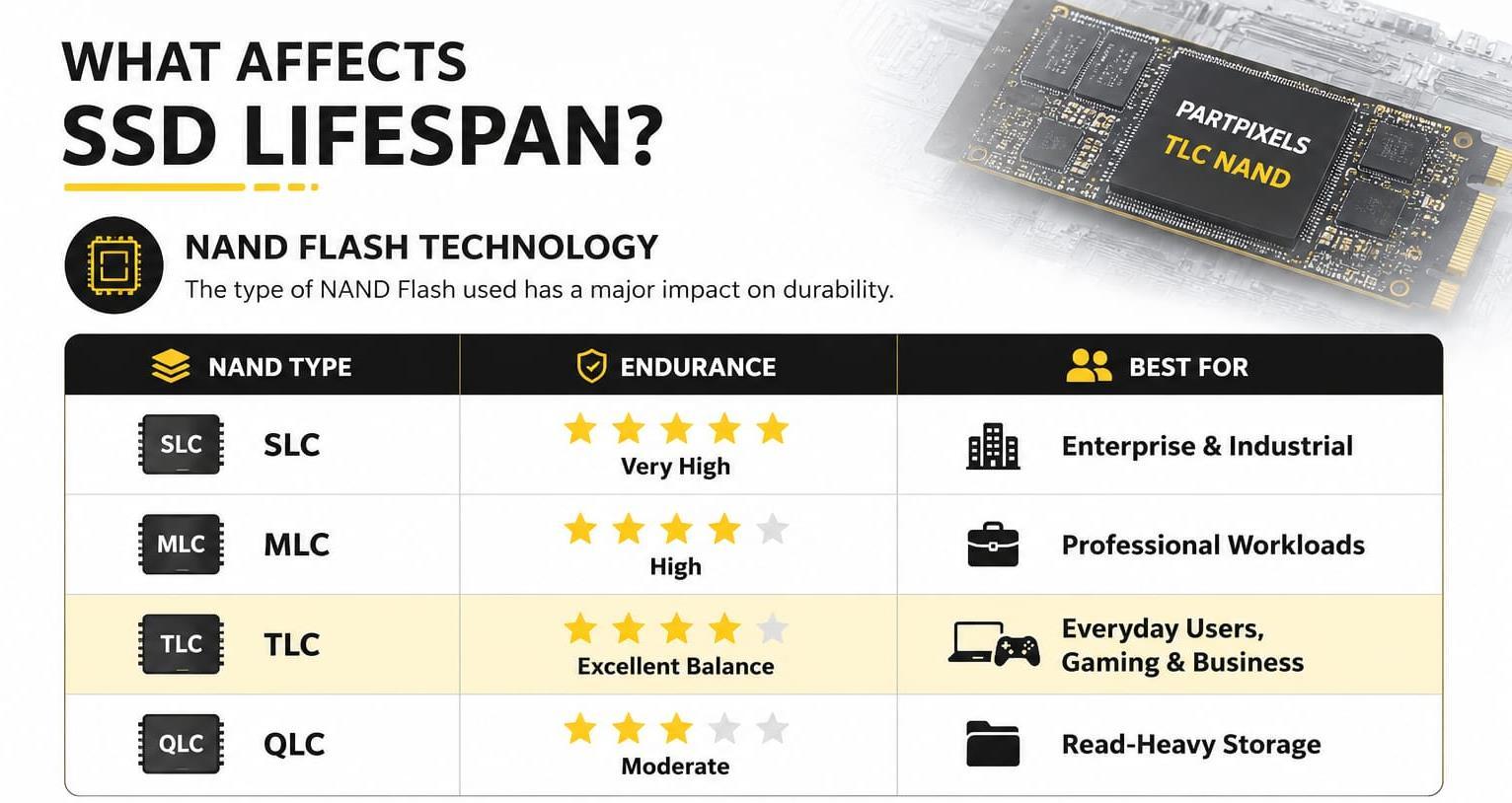
Daily Usage and Estimated Endurance
The volume of data written each day has a direct effect on how quickly an endurance rating is consumed. For a 600 TBW drive, 20 GB of writes per day can theoretically take more than 80 years to reach the rating; 50 GB per day is roughly 33 years; 100 GB per day is around 16 years.
Heavier use changes the calculation: approximately 200 GB per day corresponds to about 8 years, while 500 GB per day is roughly 3 years. Most home and office users write around 20-50 GB per day, so normal use is unlikely to exhaust a modern SSD quickly.
Operating Temperature and Stable Power
Keeping an SSD cool supports sustained performance and longevity. Typical ranges are around 30-45 degrees Celsius at idle, 40-60 degrees during normal use, and up to 70 degrees under heavy workloads. Above 80 degrees, a drive may reduce performance to protect itself.
Unexpected power loss can contribute to data corruption, firmware issues, or controller errors. A quality power supply - and a UPS where appropriate - helps protect both system and data.
Practical Ways to Extend SSD Life
Keep 10-20% of the drive free, ensure TRIM is enabled, maintain current firmware, provide adequate airflow, monitor drive health occasionally, and back up important files regularly.
These simple habits reduce unnecessary pressure on the drive and protect data independently of the SSD's endurance rating.
Download the full guide:
How Long Does an SSD Last? (PDF)